































Use Two-step verification to protect your account: Activate two-step verification to add more security to your WhatsApp account. Once enabled, you will be asked for a 6-digit PIN when resetting or verifying your account. This safeguards your account against phishing attacks and takeover attempts by scammers.
Always use the official app: Make sure you’re using the latest version of the official WhatsApp. Your messages are only secure and private when using the official app. Make sure the logo looks correct, and the name of the app is just “WhatsApp”. Fake apps pose security risks, including sending spam and scams to others without your knowledge. If you’re on Android and simply want two accounts on your phone, you can now add a second account using one official app (Learn more)
Safeguard sensitive information with disappearing options: For greater privacy on your messaging experience, you can choose to send photos and media with View Once that will allow recipients to see the message only once without the option to save, forward, screenshot or share the message. View once is also available for voice notes, allowing them to be played just once.
Switching off read recipients and using disappearing messages are other features to further protect chats that are important to you.
Protect your most personal chats with Chat Lock: Add another layer of security to your intimate conversations with chat lock. It places a particular chat thread in a folder that can only be accessed by you. You can also create a unique password that’s different from your device password to protect chats that mention personal or financial information. In the event someone else gets access to your phone, chat lock will keep your conversations safe from prying eyes.
Be the best admin for your Group/Community: If you’re the admin for your work WhatsApp group or your neighbourhood community, you can safeguard it to ensure it’s a place for meaningful connection and conversations. You can decide who joins a group, restrict members’ permissions to make changes to your community’s subject, icon or description, even delete unwanted messages or remove members.
Protect against scams: Scams can happen anywhere, via calls, email or messages. The first step to protecting yourself is to pause and think. If you receive a suspicious message that asks for personal information, verify if you know the contact, have common groups with them or is even coming from the country you’re in. WhatsApp asks if you want to Block an unknown contact right away. Even later, it is easy to report and block suspicious contacts to keep your account secure.
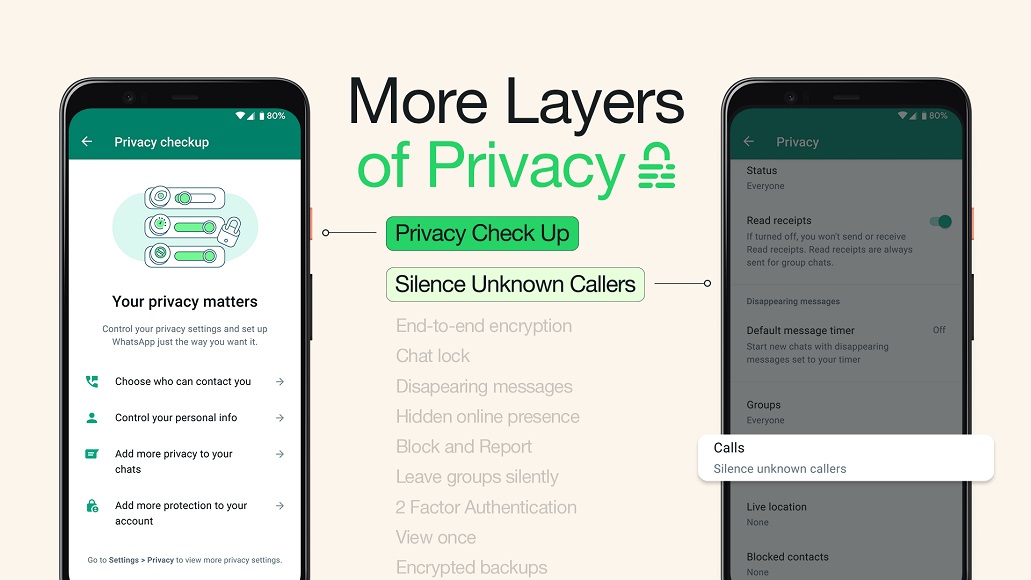
Silence unknown callers: Calls from unknown numbers can disrupt your day.WhatsApp lets you silence unknown callers, helping automatically prevent spam and scam calls.
Only link devices from trusted sources: WhatsApp lets you link up to four devices to your primary phone for an uninterrupted chat experience. However, when linking your device to a desktop using a QR code, make sure you type in theURL web.whatsapp.com or have the official app (from whatsapp.com/download or the app store). You can also review your linked devices by going to Settings>Linked Devices and logging out any device you don’t recognise.
Take the Privacy checkup: Not sure about which privacy settings to use? Take the privacy check up on your WhatsApp app to know more about features that can keep your conversations protected and enable the features you need, all in one place.